 IT
 US
 UK
 DE
 ES
 FR
 BARGAIN RADAR UK
Buying a monitor
Monitors: the number on the box is rarely the one that matters
The first question is not the panel
Every monitor guide opens with panel types. That is the wrong place to start, because the answer depends on something nobody asks you first: what you will be doing in front of it for eight hours a day.
A screen that is excellent for editing photographs can be a poor buy for spreadsheets, and the reverse — not because one is better made, but because they spend their cost in different places. So: the use first, then the numbers that belong to it, and last the ones you can stop reading.
The most sold and least understood number: 4K
Resolution counts pixels; it does not measure quality. The same 3840 × 2160 on a 24-inch panel and on a 32 is not the same screen, and the difference is not sharpness — it is how much usable room is left once you have scaled the text up enough to read it.
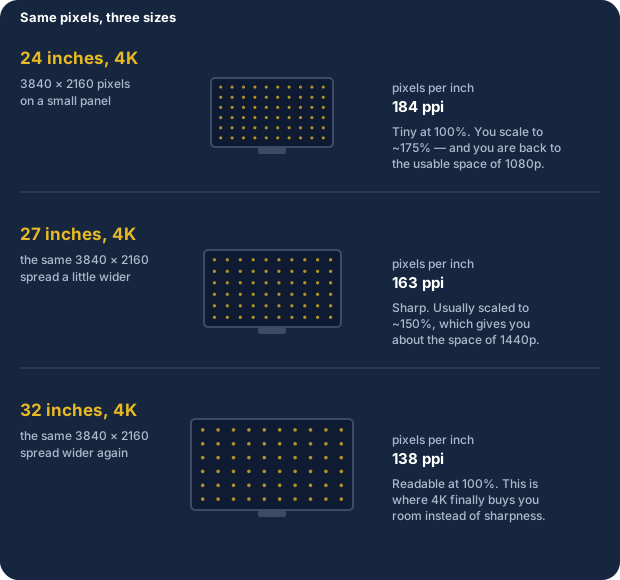
Which is why a 24-inch 4K is nearly always the wrong buy: you pay for the pixels and then give most of their benefit back at 175% scaling. For the same money a 27-inch 1440p leaves you more desktop and asks far less of your graphics card.
What you actually use it for
- Writing, email, spreadsheets. Usable room and text that does not tire you: 27 inches at 1440p, or 32 at 4K. Refresh rate is irrelevant here. Spend the extra on a height-adjustable stand rather than on hertz — your neck will notice it, your eyes will not notice 144 Hz in a document.
- Photo and video. The panel does matter: IPS, and a spec sheet that states sRGB coverage as a number. "16.7 million colours" has been on every box since the nineties and means nothing. If the work leaves your desk, a monitor you can calibrate beats a higher resolution.
- Gaming. Refresh rate and variable sync, in that order, and both tied to what your graphics card can actually produce. More below — this is where the money goes astray.
- Two screens. The second does not need to match the first. What matters is getting the tops level — a height-adjustable stand or a VESA arm — and having the ports to drive both. A mismatched pair at the same height beats a matched pair at different heights.
- A laptop on the desk. One port changes the day: USB-C carrying video and power together, so the laptop charges down the same cable. Check the wattage — 65 W runs most ultrabooks, 100 W is needed for the larger ones, and "USB-C" on its own promises neither.
The numbers printed to be sold
- "1 ms". Almost always measured in a way you will never experience: MPRT with backlight strobing switched on, or the single quickest grey-to-grey transition in the table. The honest figure is the average across transitions, and it is not printed.
- HDR400. DisplayHDR 400 requires no local dimming and 400 nits of peak brightness, which a decent SDR monitor already manages. It is a label, not a feature. HDR starts to mean something at DisplayHDR 600 with local dimming, and properly at 1000.
- "Dynamic contrast 1,000,000:1". Measured by switching the backlight off on a black screen. The figure that describes the picture is static contrast — around 1000:1 on IPS, 3000:1 on VA.
- Very high refresh rates. A monitor cannot show more distinct images than the graphics card produces. If the game runs at 70 fps, a 240 Hz panel shows 70 — and while 60 to 120 is obvious, 144 to 240 is something most people cannot pick out blind.
- Curved. It earns its keep at 32 inches and above and on ultrawides, where the edges really are further from your eyes. On a 24-inch it is styling you are paying for.
None of these is a lie. Each is a true measurement of something — just not of the thing you are buying the monitor for.
Gaming, without paying for what you will not use
Start from the graphics card, not the monitor. The card decides the resolution; the monitor decides what it does with the frames it is given.
- Match the resolution to the card. 1440p at 144 Hz is where most cards sit comfortably. 4K at a high refresh rate needs hardware that costs more than the screen.
- Variable sync matters more than peak hertz. FreeSync or G-Sync Compatible removes tearing and the stutter you get when the frame rate wanders, which is the part you actually feel. It is cheap and widespread now; a monitor without it is an old design at any price.
- OLED on a desk comes with a condition. The blacks are in another league, but a desktop shows the same taskbar and the same window borders for hours, and static elements are precisely what burns in. Manufacturers now offer mitigations and a warranty against it — read that warranty before paying the premium.
- Panel type, briefly: IPS for colour and viewing angles, VA for contrast in a dark room, TN only if the budget forces it. The gap between a good IPS and a good VA is much smaller than the gap between the right size and the wrong one.
Side by side
| Writing and office | Photo and video | Gaming | |
|---|---|---|---|
| Size and resolution | 27" 1440p or 32" 4K | 27" 1440p or 4K | 27" 1440p |
| Panel | Any decent IPS | IPS, with stated sRGB | IPS or VA |
| Refresh rate | 60 Hz is fine | 60 Hz is fine | 120-144 Hz |
| Worth paying extra for | Adjustable stand | Colour accuracy | Variable sync |
| Safe to ignore | Hertz, HDR400 | Hertz, curvature | "1 ms", 240 Hz |
And then there is the price
Monitors are the category where a crossed-out price is easiest to inflate, because a model stays on sale for years and its launch list price stops meaning anything after the first six months.
- Ask what the "was" price actually was. UK guidance is that a reference price should be one the retailer genuinely charged, and recently — not a figure that sat on a page unused. A percentage off a price nobody paid is not a discount.
- Prefer the reference the retailer shows itself, and read how it is defined. There is no fixed statutory window here the way there is in the EU, so the wording next to the crossed-out number is the thing worth reading, not the number.
- Check the exact model code. Manufacturers keep a model name across revisions and sometimes change panel supplier mid-run, so two monitors with the same name on the box can differ in contrast and in response.
- Watch the condition. Renewed and open-box listings are common and can be a genuine bargain, but the panel is the part that ages, and the discount should reflect that rather than only the list price.
This is the same check we run before publishing. If a price does not survive it, the deal does not go out — which is why some days we publish less.
Monitors on offer right now
Pulled from our own archive when you open this page, not written into the article. Prices are checked at publication and can change.
…
All deals, in real time, on the Telegram channel
We are on Instagram too, with the day’s deals in pictures.
Follow us on InstagramThe other sites in the network:Colpo di Sconto · Deal Scout US · Bargain Radar UK · SparFinder DE · Rebajo Inteligente · Le Bon Rabais
Some links are affiliate links (#ad): no extra cost to you, a small commission to us.
As an Amazon Associate I earn from qualifying purchases.
Prices are verified at publication time and may change.
This site is not a news publication: it has no regular schedule and is not a registered editorial product. We collect offers published by third-party sellers: the purchase contract is with them, and prices and availability can change after publication. Trademarks and images belong to their respective owners and appear only to identify the products.
About us · Contact · Affiliate disclosure · Privacy · Terms